
One-tap subject cutout
Apple's Vision engine finds the person or object in any frame and lifts it onto transparency — no manual masking, no green screen.
FramePeel opens your video, lets you scrub to the exact frame, and lifts the subject out as a crisp, transparent PNG — edges, batch export and all. No cloud, no subscription, no fuss.


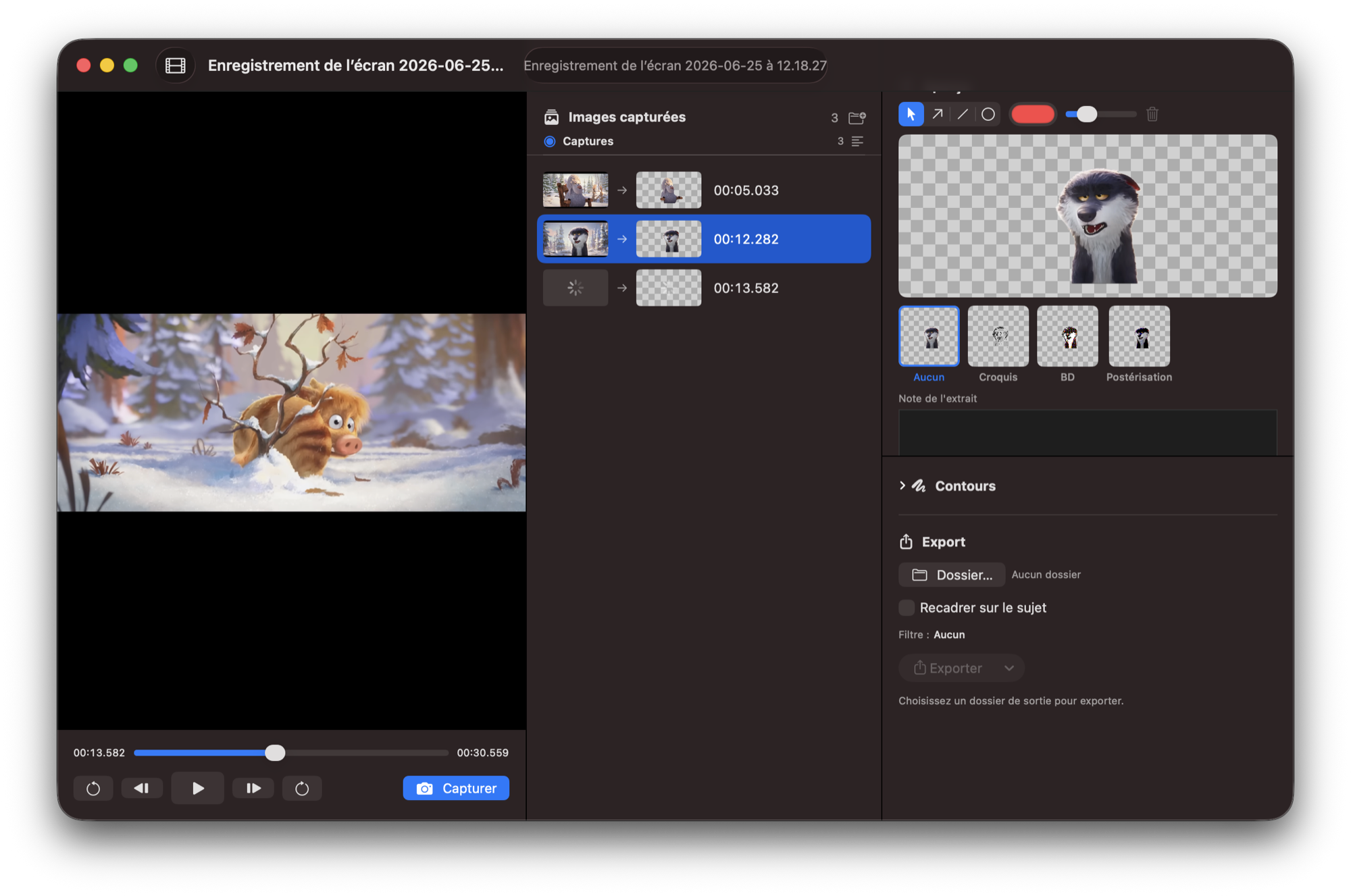
The whole workspace — scrub on the left, captures in the middle, extraction and export on the right.
FramePeel is a focused tool, not a video editor. Each feature exists to get a subject off the frame and into your work faster.
Apple's Vision engine finds the person or object in any frame and lifts it onto transparency — no manual masking, no green screen.
Open a clip, glide the timeline, and capture the exact moment. Stack as many frames as you need before exporting.
Feather, contract or clean up the cutout edge so hair and outlines stay believable against any background.
Apply a filter style to the lifted subject for a consistent look across a whole set of captures.
Draw and mark up frames right on the canvas when a plain cutout isn't enough.
Send every captured frame to a folder of transparent PNGs in one pass — named and ready to drop into your design tool.
Speaks your language. Localised in 12 languages.
The whole loop takes seconds — and never leaves your Mac.
Drag a clip in or pick one with the file importer. FramePeel loads it into a player you can scrub frame by frame.
Pause on the moments you want and capture them. Each grab lands in a list, ready to be lifted.
FramePeel masks out the subject, you tidy the edges, then export the lot as transparent PNGs to any folder.
Short answers. If something's missing, reach out on X.
A Mac running macOS 26 (Tahoe) or later. FramePeel is a native app — apple silicon.
No. FramePeel does everything on-device using Apple's built-in Vision framework. Your footage never leaves your Mac, and the app runs in the macOS sandbox.
Transparent PNG files — one per captured frame, with the subject cut out and the background removed. They drop straight into Figma, Keynote, Photoshop or your editor of choice.
FramePeel is free to download and use. If it saves you time, you can support development with a coffee — entirely optional.
Yes. Capture as many frames as you like, then batch-export the whole set to a folder in a single pass.
FramePeel saves your captures and settings to a project file so you can reopen and pick up where you left off.
12 languages: Français, English, Español, Deutsch, Italiano, Português (Brasil), 日本語, 简体中文, 한국어, Русский, Nederlands, Polski.
Free, native, and entirely on your Mac. Download FramePeel and turn any clip into clean transparent cutouts in minutes.
macOS 26 (Tahoe) or later · Apple silicon · No account needed